
Florida Institute of Neurology
How to book your appointment online
Follow these steps to schedule through the Healow portal — available at all 5 of our locations, no phone call needed.
New patient? Please allow at least 24–48 hours when requesting your first appointment. Existing patients can book with as little as 30 minutes notice. Questions? Call (407) 818-1664.
Watch the full booking walkthrough
Prefer video? Follow along step-by-step in under 5 minutes
On the Website
1
myflneuro.com
Visit the FION website
Go to myflneuro.com on any device. On the homepage you'll find a "+ Appointment" button in the top-right header, and a red "Book Now" button in the hero section. Click either one to start.
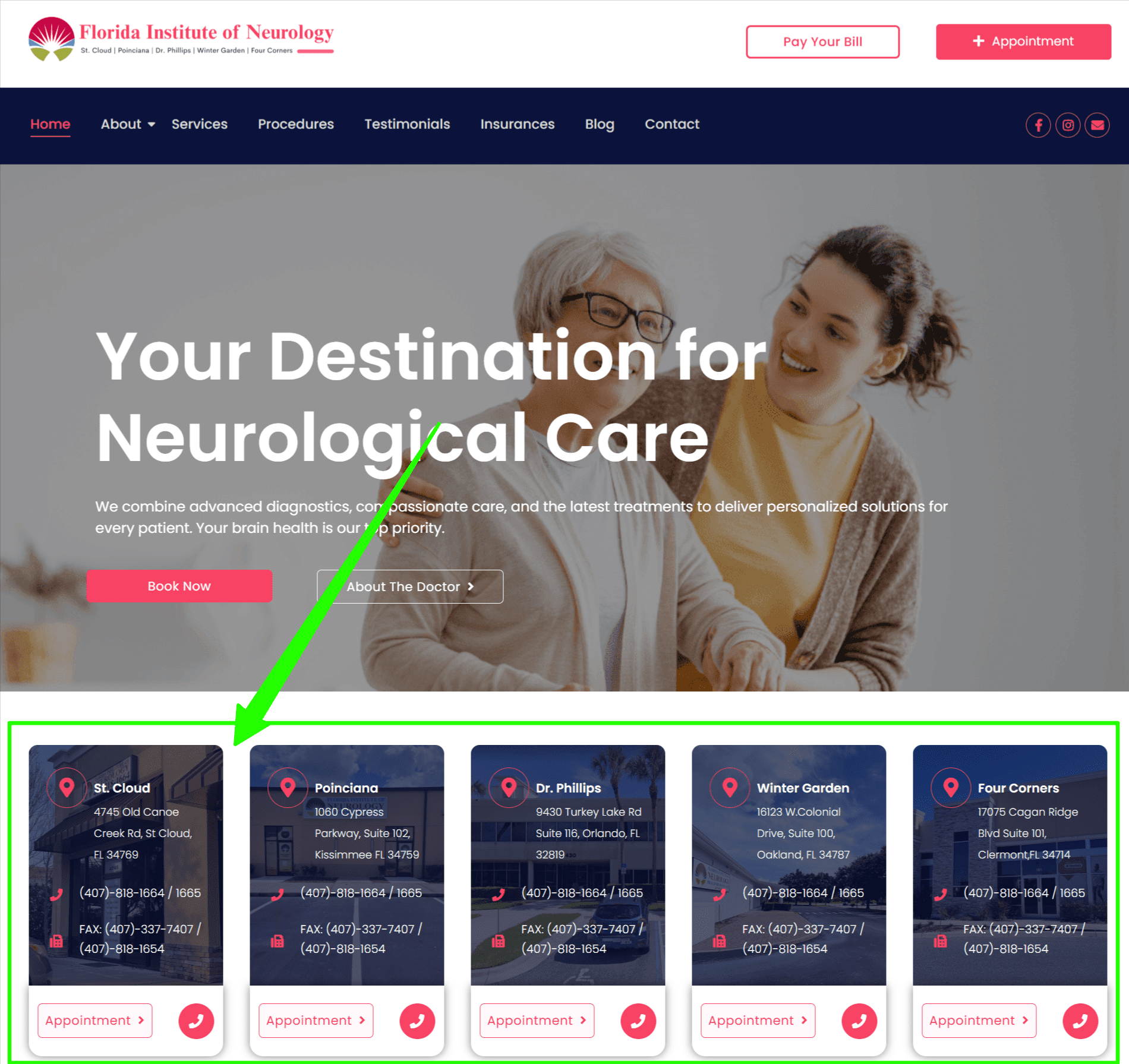 Website — Homepage
Tap to enlarge
Website — Homepage
Tap to enlarge
2
Choose a location
Select your preferred office
Scroll down to see all 5 location cards. Find your nearest office and click the Appointment > button on that card.
- St. Cloud — 4745 Old Canoe Creek Rd
- Poinciana — 1060 Cypress Pkwy, Suite 102
- Dr. Phillips — 9430 Turkey Lake Rd, Suite 116
- Winter Garden — 16123 W. Colonial Dr, Suite 100
- Four Corners — 17075 Cagan Ridge Blvd, Suite 101
All 5 locations share the same number: (407) 818-1664. If unsure, St. Cloud is our main location.
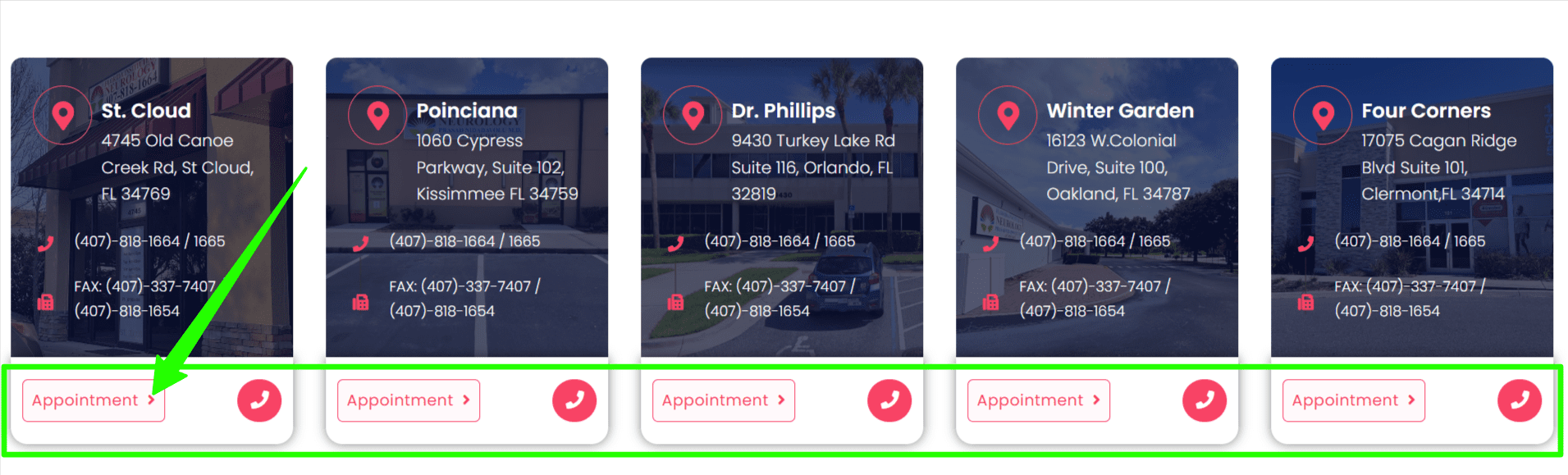 Website — Location cards
Tap to enlarge
Website — Location cards
Tap to enlarge
Inside Healow Scheduler
3
Provider selection
Click "Book" & set preferences
The Healow scheduler opens automatically. Click the Book button on the FION provider card. A popup appears — fill in:
- Have you visited before? Select Yes or No
- Choose your Appointment Reason from the dropdown (required)
- Filter by Morning, Afternoon, or Evening
The Appointment Reason is required — you cannot proceed without it. Choose "New Patient" for first visits, "Follow Up Visit" for existing patients.
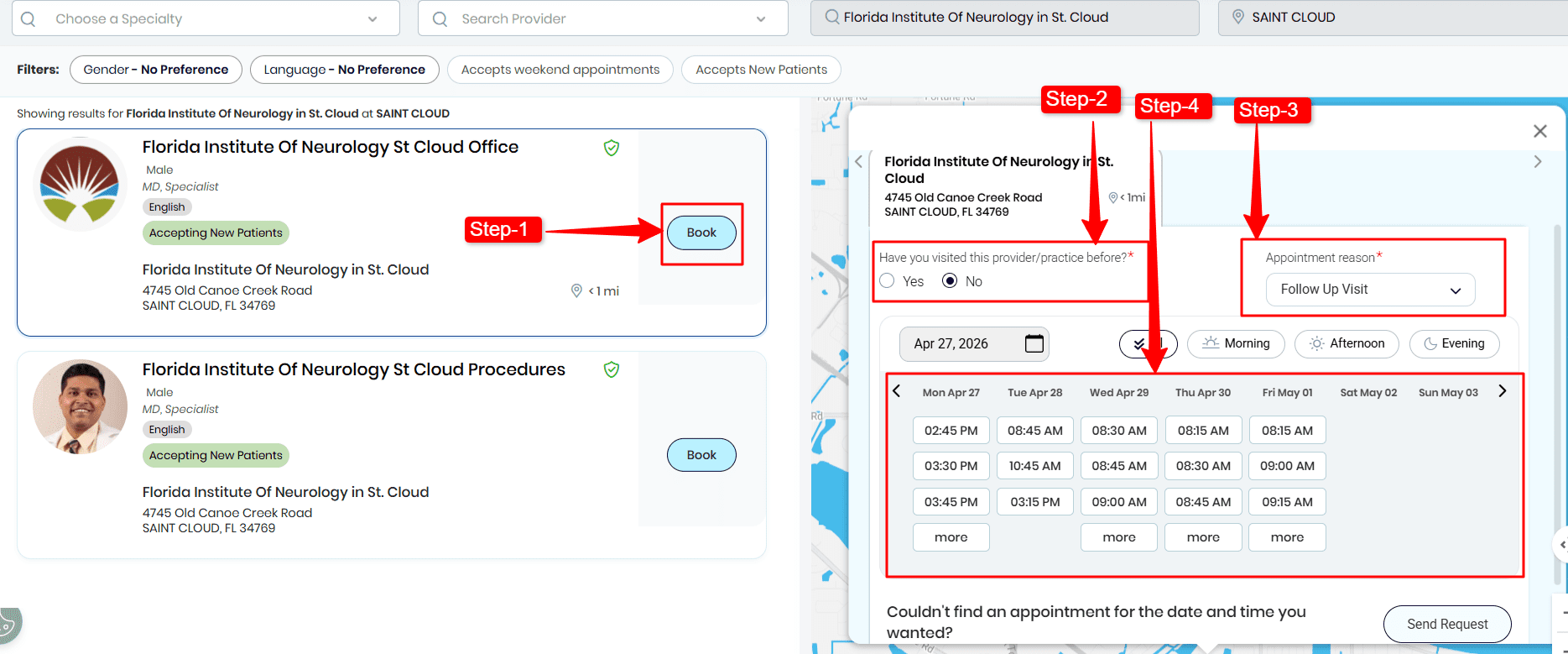 Healow — Provider & preferences
Tap to enlarge
Healow — Provider & preferences
Tap to enlarge
4
Scheduling
Pick your date & time
A weekly calendar shows all available slots. Use the arrows to browse weeks. Click any time that works for you.
Can't find a slot? Scroll down and click "Send Request" — tell us your preferred date and we'll do our best.
Can't find a slot? Scroll down and click "Send Request" — tell us your preferred date and we'll do our best.
Healow — Date & time picker
Tap to enlarge
5
Patient details
Enter patient information
Choose "Book for Myself" or "Book for Someone Else" for a family member. Then fill in:
- First & last name (as on driver's license)
- Date of birth & sex
- Phone number & email address
- Address, language, race & ethnicity
Click Continue when done.
Your name must match your insurance card or government ID exactly to avoid registration delays.
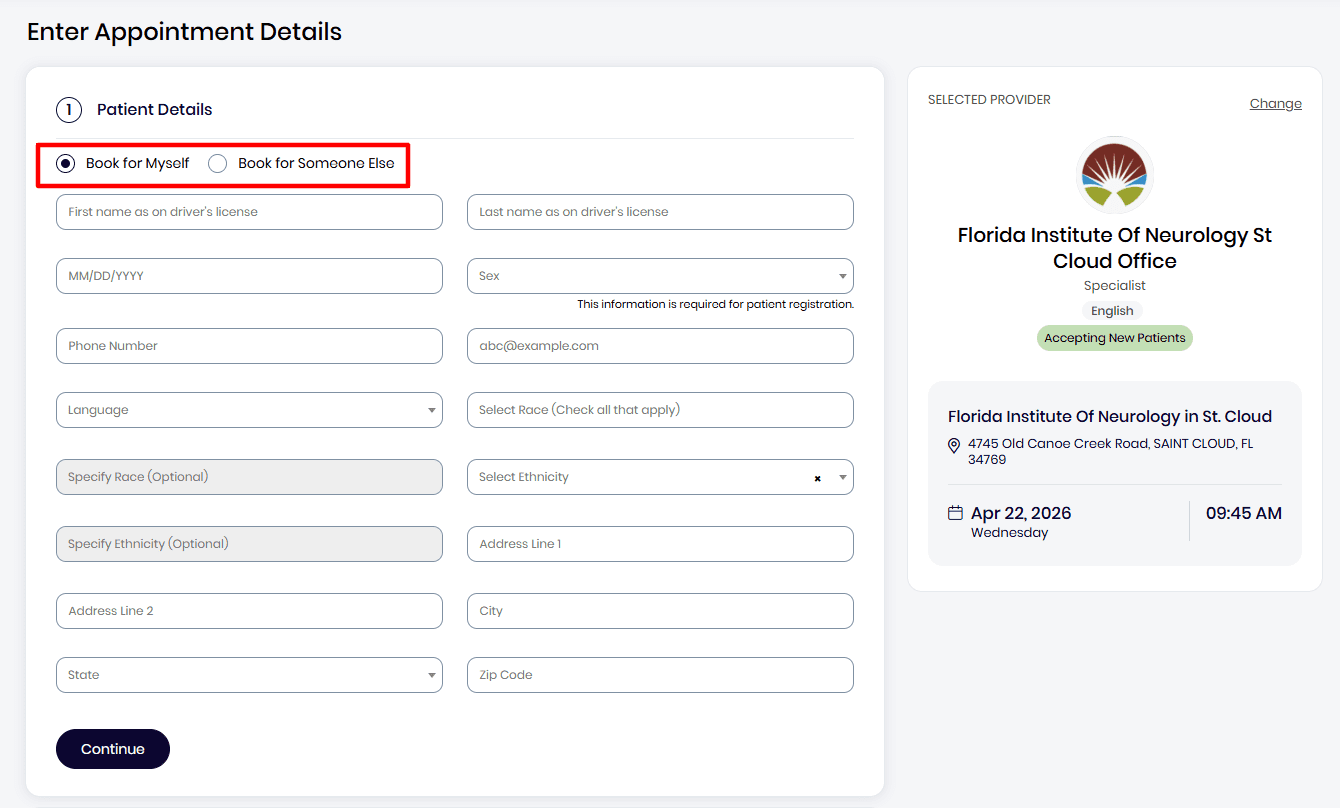 Healow — Patient info form
Tap to enlarge
Healow — Patient info form
Tap to enlarge
Verify & Confirm
6
Phone verification
Verify your phone number
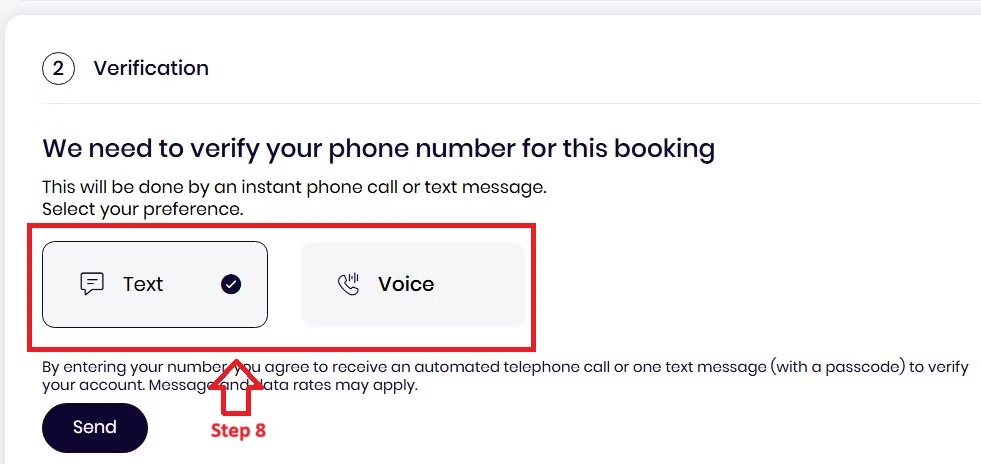
Healow will ask you to confirm your identity. Choose to receive a 6-digit code by Text message or Voice call, then click Send.
Didn't receive the code? Tap Resend or switch to voice call. Codes expire after a few minutes.
 Healow — Phone verification
Tap to enlarge
Healow — Phone verification
Tap to enlarge
7
OTP code
Enter the 6-digit code
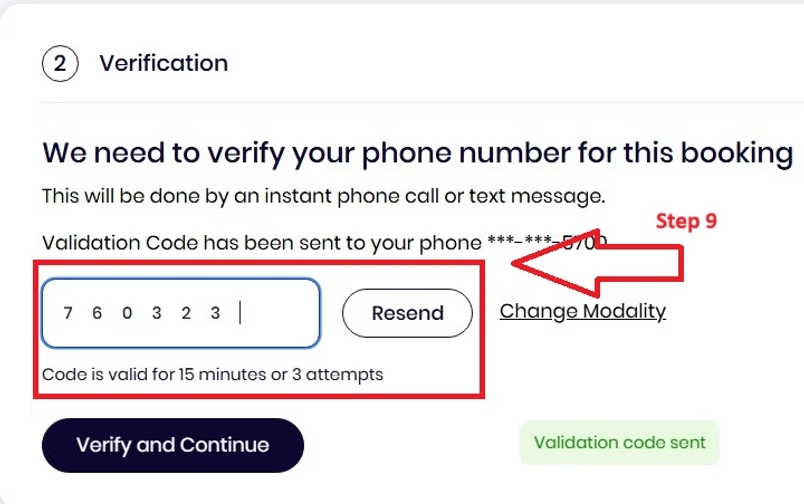
Type the code you received into the six boxes shown on screen. Click Verify and Continue to confirm your identity and move to the final step.
Still not received? Try the voice call option or double-check the phone number you entered in Step 5.
 Healow — OTP entry
Tap to enlarge
Healow — OTP entry
Tap to enlarge
8
Payment & submit
Select payment & book
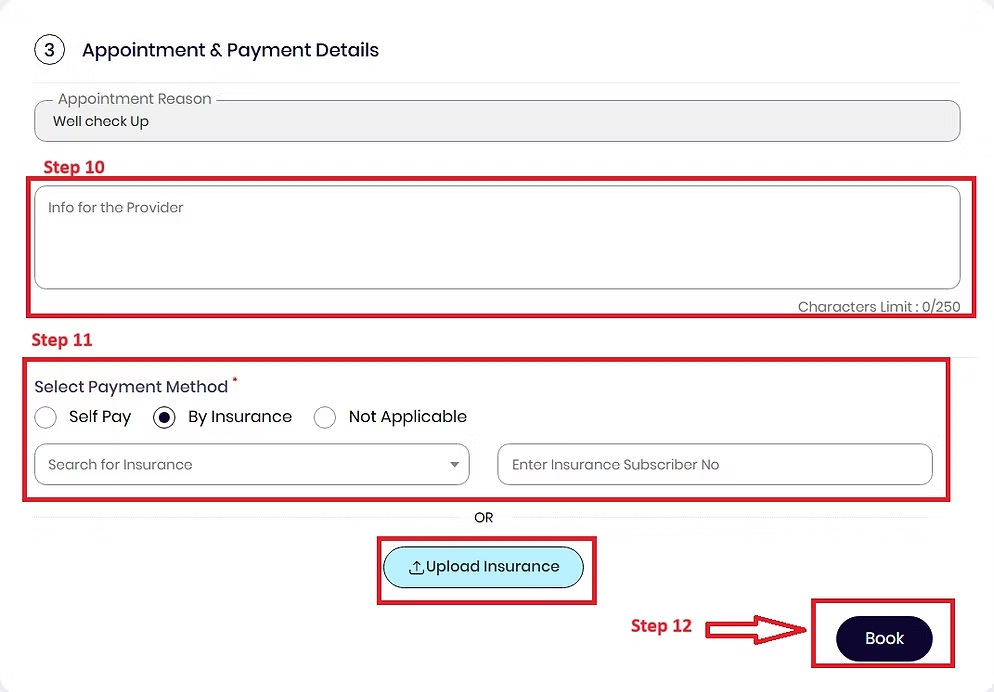
Choose how you'll cover your visit:
- Have insurance? Select your plan and enter your subscriber ID — or upload a photo of your card (front & back)
- No insurance? Choose Self Pay
Review your appointment summary — provider, location, date, time — then click Book to send your request.
We accept Medicaid, Medicare, and most major commercial plans. Unsure if we take yours? Call (407) 818-1664 before booking.
 Healow — Payment & book
Tap to enlarge
Healow — Payment & book
Tap to enlarge
You're all set!
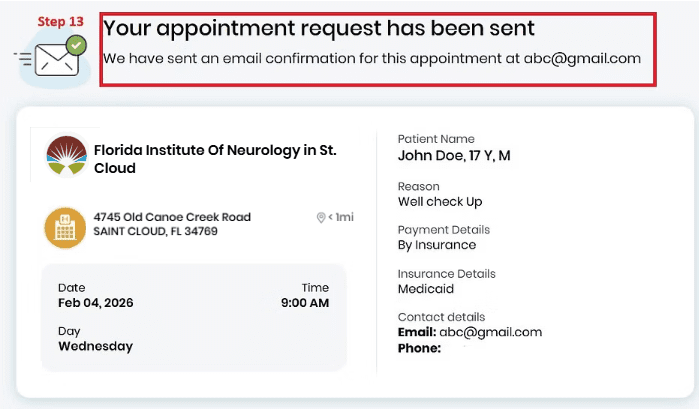
You'll receive a confirmation email — "Your appointment request has been sent" — at the address you provided.
Please note this is a request. Our team will reach out to confirm your slot. Check your inbox and spam folder.
Please note this is a request. Our team will reach out to confirm your slot. Check your inbox and spam folder.
Our 5 Locations
St. Cloud
4745 Old Canoe Creek Rd, St Cloud, FL 34769
Poinciana
1060 Cypress Pkwy, Suite 102, Kissimmee FL 34759
Dr. Phillips
9430 Turkey Lake Rd, Suite 116, Orlando FL 32819
Winter Garden
16123 W. Colonial Dr, Suite 100, Oakland FL 34787
Four Corners
17075 Cagan Ridge Blvd, Suite 101, Clermont FL 34714
Frequently Asked
It's a request. Once submitted, our team reviews it and contacts you to confirm. You'll receive an email titled "Your appointment request has been sent" straight away.
Scroll to the bottom of the Healow calendar and click "Send Request." Tell us your preferred date and time. You can also call or text us at (407) 818-1664.
Click "Resend" on the verification screen. If it still doesn't arrive, switch from text to voice call. Make sure the phone number you entered matches your registered mobile.
Yes — at Step 5, choose "Book for Someone Else" and enter the patient's details. You'll then provide your own contact information as the person scheduling.
We accept Medicaid, Medicare, and most major commercial insurance plans. Visit myflneuro.com/insurances for the full list, or call us before your appointment to confirm.